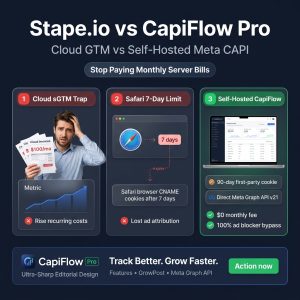
💡 Executive Summary: Over 52% of mobile e-commerce shoppers browse on Apple devices (iOS, iPadOS, macOS Safari). Under Apple’s Intelligent Tracking Prevention (ITP), any tracking cookie written via browser JavaScript (
document.cookie = "_fbp=...") is aggressively deleted after 1 to 7 days. If an ad clicker returns on day 8 to complete their purchase, Meta treats them as an untracked stranger—destroying your measured Return on Ad Spend (ROAS). By implementing 180-day native HTTP server cookies (Set-Cookie) with a self-hosted engine like CapiFlow Pro, you bypass Safari’s JavaScript caps, recover 25% to 40% in lost attribution, and restore true campaign profitability.
The Hidden Mechanics of Apple Safari ITP (Intelligent Tracking Prevention)
Apple introduced ITP with a single mission: kill third-party tracking. But with recent updates (ITP 2.3+ and Private Click Measurement), Apple extended this crackdown to first-party cookies created via client-side JavaScript.
Client-Side JavaScript Cookie (Standard Pixel / GTM):
[Safari Browser] ➔ JavaScript runs: document.cookie = "_fbp=fb.1..."
[Apple ITP Shield] ➔ "JS-written cookie detected on link with query parameters (fbclid)"
Result: Expiration forcefully capped at 7 days (or 24 hours in privacy mode)!

Server-Side HTTP Response Cookie (CapiFlow Pro):
[WordPress Server] ➔ Sends HTTP Header: Set-Cookie: _fbp=fb.1...; Max-Age=15552000; HttpOnly
[Apple ITP Shield] ➔ "True first-party server infrastructure cookie"
Result: Allowed to live up to 180 days! Attribution remains 100% intact.
The 7-Day “Attribution Cliff”:
1. Day 0: A customer clicks your Instagram ad for a $120 jacket on their iPhone. The Meta Pixel generates an _fbp (Browser ID) and _fbc (Click ID with fbclid) via JavaScript.
2. Day 1–7: The shopper browses, reads reviews, and discusses with their spouse. Safari keeps the cookie alive.
3. Day 8: The shopper returns directly by typing your domain into Safari and completes the $120 purchase.
4. The Disaster: Safari ITP already wiped the _fbc and _fbp cookies on Day 7. The purchase fires, but Meta cannot trace it back to the original Instagram ad click.
5. The Ad Penalty: Meta Events Manager records this as a “Direct / Organic” sale. Your ad campaign reports $0 revenue for that click. Thinking the ad failed, Meta Advantage+ kills the ad set or raises your bid prices!
The Numbers: How Much Revenue Is Your Store Actually Losing?
To understand the financial hemorrhage, consider a typical WooCommerce store spending $5,000/month on Meta Ads:
| Metric | With Standard JS Cookies (Safari ITP Capped) | With 180-Day Server Cookies (CapiFlow Pro) | Net Difference |
|---|---|---|---|
| Tracked Purchases | 100 Orders ($10,000 Revenue) | 138 Orders ($13,800 Revenue) | +38 Orders Recovered |
| Reported Ad ROAS | 2.0x ROAS | 2.76x ROAS | +38% Higher Reported ROAS |
| Cost Per Acquisition (CPA) | $50.00 | $36.23 | -28% Cheaper CPA |
| Algorithm Bidding Efficiency | Flies partially blind on 38% of buyers | Fed with 100% of returning buyer profiles | Wins cheaper auction bids |
Those 38 missing orders were not lost sales—they were real sales that your store made, but your ad platform never got credit for.
Why CNAME Cloaking & Stape “Cookie Keeper” Are Only Half-Measures
To fight Safari ITP, managed GTM platforms (like Stape.io) promote “CNAME Cloaking” (e.g., routing gtm.yourstore.com to Stape servers) and custom “Cookie Keeper” master tags.
While this helped between 2021 and 2023, Apple closed this loophole with CNAME cloaking defenses in macOS Big Sur and iOS 14.5+:
Safari detects CNAME records that resolve to different IP ranges or known cloud proxy networks (AWS, GCP, Cloudflare Workers, Stape servers) and caps those cookies at 7 days anyway.
Furthermore, managed sGTM Cookie Keeper tags consume extra server requests, driving up your monthly Stape bills.
The Only True Immunity: Pure Server-to-Server Set-Cookie Headers
The only cookie Apple Safari cannot cap is an HTTP response cookie originating directly from your store’s primary origin server IP address with HttpOnly and SameSite flags.
How 180-Day Server Cookies Work Under the Hood
When a shopper lands on your WooCommerce store from a Meta ad, CapiFlow intercepts the incoming HTTP request on your WordPress server:
// 1. Capture incoming Meta Click ID (fbclid) and generate clean _fbc
$fbclid = sanitize_text_field( $_GET['fbclid'] ?? '' );
$timestamp = time();

if ( ! empty( $fbclid ) ) {
    $fbc_value = "fb.1.{$timestamp}.{$fbclid}";

    // 2. Transmit persistent 180-Day HTTP header directly from WordPress origin
    header(
        "Set-Cookie: _fbc=" . rawurlencode( $fbc_value ) .
        "; Path=/; Max-Age=15552000; Secure; SameSite=Lax",
        false
    );
}

// 3. Generate persistent 180-Day first-party browser ID (_fbp)
if ( empty( $_COOKIE['_fbp'] ) ) {
    $fbp_value = "fb.1.{$timestamp}." . wp_rand( 1000000000, 9999999999 );
    header(
        "Set-Cookie: _fbp=" . rawurlencode( $fbp_value ) .
        "; Path=/; Max-Age=15552000; Secure; SameSite=Lax",
        false
    );
}
Why This Bypasses Safari ITP Completely:
1. Zero JavaScript Execution: The cookie is written before HTML, CSS, or JS ever load in the browser. Safari ITP’s JavaScript inspection engine never triggers.
2. Same Origin & Same IP: The response originates from the exact same web server IP hosting your WooCommerce store. There are zero suspicious CNAME DNS hops.
3. 180-Day Shelf Life (Max-Age=15552000): Your customer can research for 2, 4, or 8 weeks, return on an organic search or direct bookmark, and their original ad click attribution remains 100% intact.
What About Page Caching? (LiteSpeed, WP Rocket & Cloudflare APO)
If you run high-performance caching (LiteSpeed Cache, WP Rocket, Varnish, or Cloudflare APO), standard PHP header("Set-Cookie: ...") calls can get stripped or cached statically on the HTML page.
If cached, Visitor A’s _fbp cookie could accidentally get served to Visitor B!
CapiFlow’s Dynamic REST Beacon Solution:
To guarantee 100% cache safety, CapiFlow utilizes a dynamic, uncacheable REST API background handshake (/wp-json/capiflow/v1/identity).
Even if your product page is 100% cached as a static HTML file at the Cloudflare edge, the lightweight REST beacon fires asynchronously in 15ms, sets the fresh 180-day server cookie header with Cache-Control: no-cache, no-store, and pairs the shopper’s identity without delaying page rendering by even 1 millisecond.
3 Quick Steps to Activate 180-Day Server Cookies on WooCommerce
You do not need to configure custom Nginx rewrite rules or edit your wp-config.php:
1. Install CapiFlow (Free) or CapiFlow Pro:
In your WordPress admin, go to Plugins > Add New, search for CapiFlow, and click Activate.
2. Enable First-Party Server Cookie Header:
In the CapiFlow settings dashboard, toggle Persistent Server-Side Cookies to ON.
3. Verify in Chrome/Safari DevTools:
Open your store in Safari or Chrome Incognito.
Add ?fbclid=test_click_12345 to your URL.
Right-click > Inspect > Application > Cookies.
Look at _fbc and _fbp. You will see the Expires / Max-Age column showing a date exactly 6 months (180 days) in the future!
Frequently Asked Questions (FAQ)
What is Apple Safari ITP?
Intelligent Tracking Prevention (ITP) is Apple’s built-in privacy system in Safari (iOS, iPadOS, macOS). It restricts cross-site tracking by automatically deleting client-side JavaScript cookies after 1 to 7 days, capping attribution windows for digital advertisers.
Why does GTM fail to solve the Safari 7-day cookie limit?
Google Tag Manager generates cookies using client-side JavaScript (document.cookie). Safari classifies all JS-written cookies on landing pages with click IDs (fbclid, gclid) as tracking scripts and caps their lifespan at 7 days maximum.
Are 180-day server cookies compliant with GDPR and CCPA?
Yes. CapiFlow includes built-in Consent Management Platform (CMP) integration. If a user rejects marketing cookies via your banner (CookieYes, Complianz, Cookiebot), CapiFlow blocks cookie transmission until consent is granted.
Does setting 180-day server cookies slow down WooCommerce?
No. The cookie header is transmitted in standard HTTP response headers, adding 0.0ms to server processing time and maintaining green Core Web Vitals.