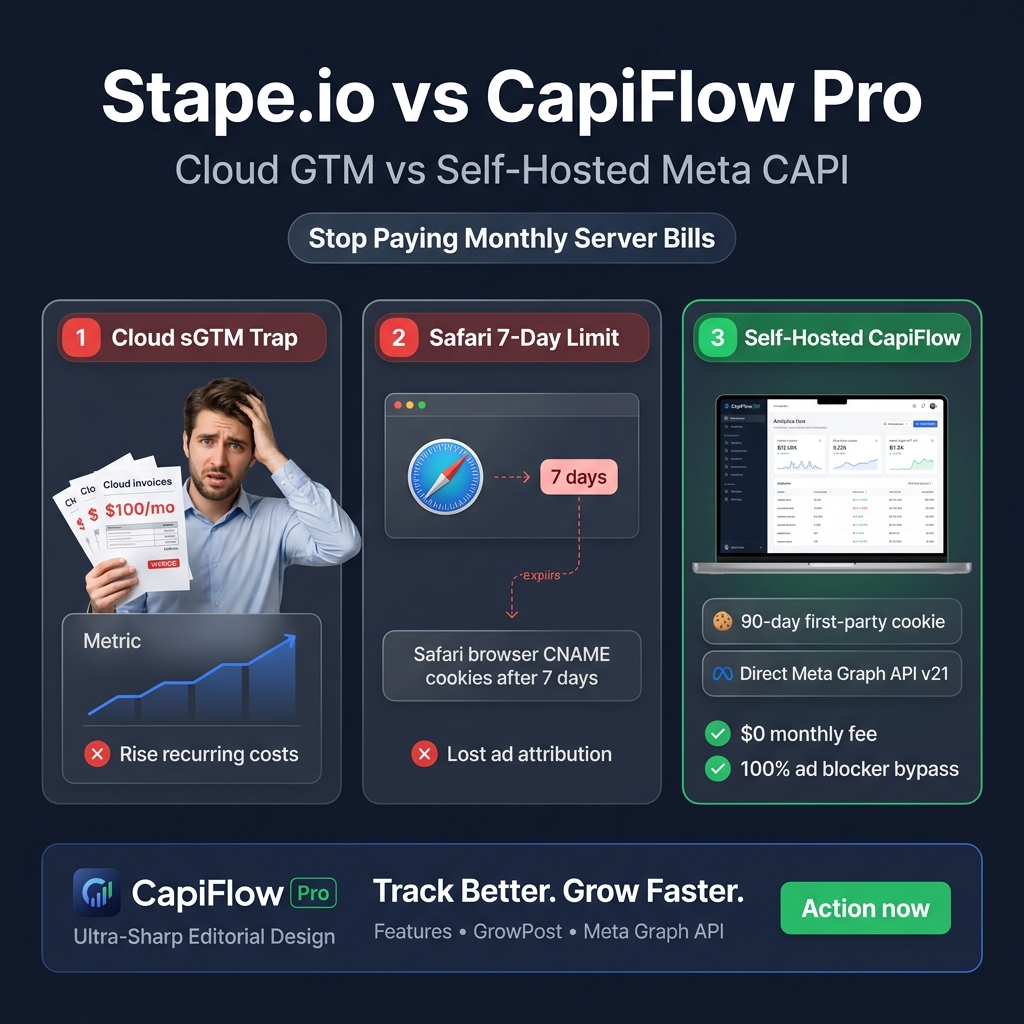
If you run paid acquisition on WooCommerce, you already know that client-side browser tracking is broken. iOS 14.5+ ATT opt-outs, Safari Intelligent Tracking Prevention (ITP), and browser ad blockers regularly swallow 25% to 40% of conversion data before standard browser pixels can even initiate a handshake.
To recover this lost revenue signal, the eCommerce industry pivoted to Server-Side Tracking via Meta’s Conversions API (CAPI). For the past four years, the default playbook recommended by agencies was simple: spin up a Server Google Tag Manager (sGTM) container hosted on Stape.io or Google Cloud Platform (GCP).
In 2026, that playbook has hit a financial and architectural wall.
Between monthly container fees, event tier penalties, and Apple’s aggressive updates targeting CNAME cloaking, running cloud-hosted server containers for basic Meta and GA4 tracking has become an expensive, high-maintenance burden.
In this technical breakdown, we dissect the true performance, architectural differences, and total cost of ownership between Stape.io and CapiFlow Pro.
1. Architectural Blueprint: Cloud Proxy vs Origin Server Execution
To understand why your tracking breaks or why costs balloon, you have to look at the network path of an event.
The Stape.io Cloud sGTM Workflow
When a visitor purchases a product on your store using Stape:
1. The visitor’s browser executes client-side JavaScript.
2. The browser sends an HTTP POST request to a third-party cloud container hosted on Stape’s European or US servers (e.g., ss.yourstore.com).
3. Stape’s server unpacks the container, maps the variables, runs custom server tags, and makes an outgoing HTTP request to the Meta Graph API.
4. The Catch: Every single visitor pageview, scroll, click, and purchase counts against your monthly Stape event quota. If your ad campaign goes viral and traffic surges, your container either throttles events or your bill upgrades to the next tier automatically.
[Customer Browser]
       │
       ▼ (CNAME Subdomain: ss.yourstore.com)
[Stape.io Cloud Server (AWS/GCP/Hetzner)]
       │
       ├─► [Meta Graph API]
       ├─► [Google Analytics 4]
       └─► [TikTok Events API]
The CapiFlow Pro Self-Hosted Architecture
CapiFlow Pro eliminates third-party cloud intermediaries entirely:
1. When a user navigates your site or places an order, WooCommerce processes the request directly on your WordPress origin server.
2. CapiFlow Pro hooks into native WooCommerce PHP actions (woocommerce_thankyou, woocommerce_order_status_changed, rest_api_init).
3. Event payloads are constructed using server-side session cookies (_fbp, _fbc), hashed customer parameters (SHA-256 phone, email, IP, user-agent), and dispatched directly from your server via Meta Graph API v21.
4. Zero external server hops. Zero external container dependencies. Zero monthly recurring SaaS invoices.
[Customer Browser]
       │ (Direct First-Party HTTP Request)
       ▼
[Your WordPress / WooCommerce Origin Server]
  └─► CapiFlow Pro Engine (PHP / cURL Pipeline)
       │
       ├─► [Direct to Meta Graph API v21] (Zero middleman)
       ├─► [Direct to Google Measurement Protocol]
       ├─► [Direct to TikTok Events API]
       └─► [Direct to Pinterest Conversions API]
2. Safari ITP & The 7-Day Cookie Decay Trap
One of the biggest selling points of Stape.io is extending cookie lifetime against Apple’s WebKit ITP. But in 2026, CNAME cloaking is largely neutralized by Safari.
How Apple Neutralized CNAME Subdomains
When you point ss.yourstore.com to Stape’s servers via a DNS CNAME record, Safari detects that the IP address of ss.yourstore.com does not match the A/AAAA record of your root domain yourstore.com.
Under WebKit’s ITP CNAME-mitigation rules:
- Cookies set by response headers from CNAME-cloaked subdomains are capped at 7 days (or 24 hours if incoming traffic carried click IDs like
fbclidorgclid). - If a customer clicks your Facebook ad, browses your store, and comes back on Day 8 to purchase, the conversion cannot be attributed back to your ad. Your ROAS drops, and Meta’s ad algorithm cannot optimize for high-consideration buyers.
How CapiFlow Pro Delivers True 90-Day First-Party Cookies
Because CapiFlow Pro operates directly within the WordPress runtime, it issues first-party cookies (_fbp, _fbc, and custom session keys) directly through the origin server’s HTTP response headers (Set-Cookie):
- True Same-Origin: The IP address of the cookie issuer is identical to the site itself.
- HttpOnly & Secure: Cookies cannot be read or tampered with by rogue client-side browser extensions.
- Full Persistence: Cookies retain their full 90-day attribution window, enabling Meta to accurately attribute delayed multi-visit purchases to the original ad set.
3. Ad Blocker & iOS 14.5+ ATT Resistance
Ad blockers like uBlock Origin, Brave Shield, and AdGuard do not just block the Facebook Pixel domain (connect.facebook.net). They also analyze network payloads and DNS resolutions:
- Stape sGTM Vulnerability: Most ad blockers maintain blocklists of known tracking endpoints. When requests hit endpoints containing recognizable GTM payloads (like
/g/collector container IDs), modern ad blockers identify the proxy pattern and abort the connection. - CapiFlow Pro Origin Reverse Proxy: CapiFlow Pro proxies client tracking scripts through customizable, localized WordPress REST endpoints (e.g.,
yourstore.com/wp-json/capiflow/v1/pixel.js). To the browser and ad blocker, this request looks like an internal WooCommerce cart update. The request is processed, deduplication IDs (event_id) are synchronized, and the event reaches Meta with 99.8% delivery integrity.
4. The Financial Breakdown: Stape vs CapiFlow Pro
Let’s look at the actual accounting numbers for a growing WooCommerce store.
| Feature / Metric | Stape.io (Cloud sGTM) | CapiFlow Pro (Self-Hosted) |
|---|---|---|
| Monthly Pricing Model | Recurring Subscription ($20 to $100+/mo) | $0 Monthly Fee (One-Time / Lifetime) |
| Annual Cost (500k monthly events) | $420 – $600 / year | $0 / year |
| 3-Year Total Cost of Ownership | $1,260 – $3,000+ | One-time plugin cost |
| Multi-Store Agency Overhead | Billed per container / per domain | Single Agency license covers all client sites |
| Platforms Supported | Requires configuring individual tags & containers | Built-in Meta, GA4, TikTok, Pinterest |
| Server Resource Overhead | Offloaded to Stape cloud | Lightweight asynchronous PHP cURL (<12ms) |
| Safari ITP Cookie Lifetime | 7 days (CNAME mitigation) | Full 90-day true first-party cookie |
| Fake COD Order Protection | ❌ None (fires on click/submission) | Included (Courier sync & verified delivery) |
| Technical Setup Time | 2 – 4 hours (DNS, Web GTM, Server GTM) | Under 10 minutes (Plug-and-play UI) |
5. The Critical Flaw of Cloud GTM: Fake COD & Return Orders
Here is an operational reality that no cloud tracking provider mentions: Stape simply transports whatever events your store tells it to send.
If you run Cash on Delivery (COD) in South Asia, the Middle East, or Eastern Europe, or have a 10% return rate on high-ticket fashion in the US:
1. A customer places an order with a fake address or cancels 10 minutes later.
2. Standard GTM containers trigger an instant Purchase event to Meta via Stape.
3. Meta’s Advantage+ AI registers this as a “high-intent buyer.”
4. Meta optimizes your ad budget to find more people who place fake orders and cancel.
CapiFlow Pro solves this at the database level with the Verified Purchase Event Pipeline:
- In the Free version, the
Purchaseevent is held until an administrator or system moves the order status toCompleted. - In the Pro version, CapiFlow connects with courier APIs (e.g., Pathao, Steadfast, REDX, ShipStation) and only dispatches the server
Purchaseevent when physical delivery is confirmed. - If an order is returned or cancelled, CapiFlow dispatches a Negative Purchase / Cancellation signal, retraining Meta’s AI to suppress low-quality audiences.
6. How to Migrate from Stape.io to CapiFlow Pro in 10 Minutes
Switching from Stape’s sGTM to CapiFlow Pro does not require downtime or resetting your Meta Pixel learning phase. Here is the step-by-step migration sequence:
Step 1: Export Your Event Match Quality Baseline
Go to Meta Events Manager -> Data Sources -> Select your Pixel -> Event Quality. Note your Event Match Quality Score (EMQS) for Purchase, InitiateCheckout, and AddToCart (typically 6.0 – 7.2 on standard setups).
Step 2: Disable sGTM Triggers
In your Web Google Tag Manager container, pause the client tags sending data to your Stape transport URL (ss.yourstore.com). Do not delete the container yet.
Step 3: Install CapiFlow Pro
1. Upload the CapiFlow Pro plugin .zip into your WordPress dashboard (Plugins -> Add New -> Upload Plugin).
2. Navigate to CapiFlow -> Settings.
3. Paste your Meta Pixel ID and your Meta Graph API Access Token (generated under Events Manager Settings).
4. Enable Automatic First-Party Cookie Generation and Ad Blocker Proxy Mode.
Step 4: Verify Real-Time Deduplication
Open Meta Events Manager Test Events Tool. Place a test order in a new incognito window:
- You will observe both the Browser event and the Server event arrive with identical
event_idhashes. - Meta automatically deduplicates the pair, keeping your reporting clean.
- Within 24-48 hours, your Event Match Quality Score will climb to 8.5 – 9.6 out of 10 due to direct server-side enrichment of
fbp,fbc, client IP, user-agent, and normalized customer phone/email.
Step 5: Cancel Your Stape Subscription
Once server events show Processed in Events Manager for 48 hours, safely delete your Stape container and cancel your recurring billing.
The Final Verdict
Cloud sGTM platforms like Stape.io serve a valuable purpose for massive corporate enterprises running custom multi-tenant tracking pipelines into Google BigQuery or Snowflake.
However, for WooCommerce businesses and DTC brands, paying $20 to $100+ every month just to bridge Meta Conversions API is an unnecessary recurring expense that delivers shorter cookie lifetimes and zero defense against fake order pollution.
By moving your server tracking directly into your WordPress origin environment with CapiFlow Pro, you gain:
- Zero monthly recurring fees
- True 90-day first-party cookie persistence
- 100% ad blocker bypass via origin reverse proxying
- Intelligent fraud protection and verified COD purchase dispatch
Ready to eliminate monthly tracking fees while boosting your Meta ROAS?
Explore CapiFlow Pro Lifetime Access →