Ask almost any performance marketer how their tracking is set up, and they will proudly tell you:
“Whenever someone hits our order confirmation or thank you page, our pixel fires a Purchase event with the cart value. We have 100% event tracking!”
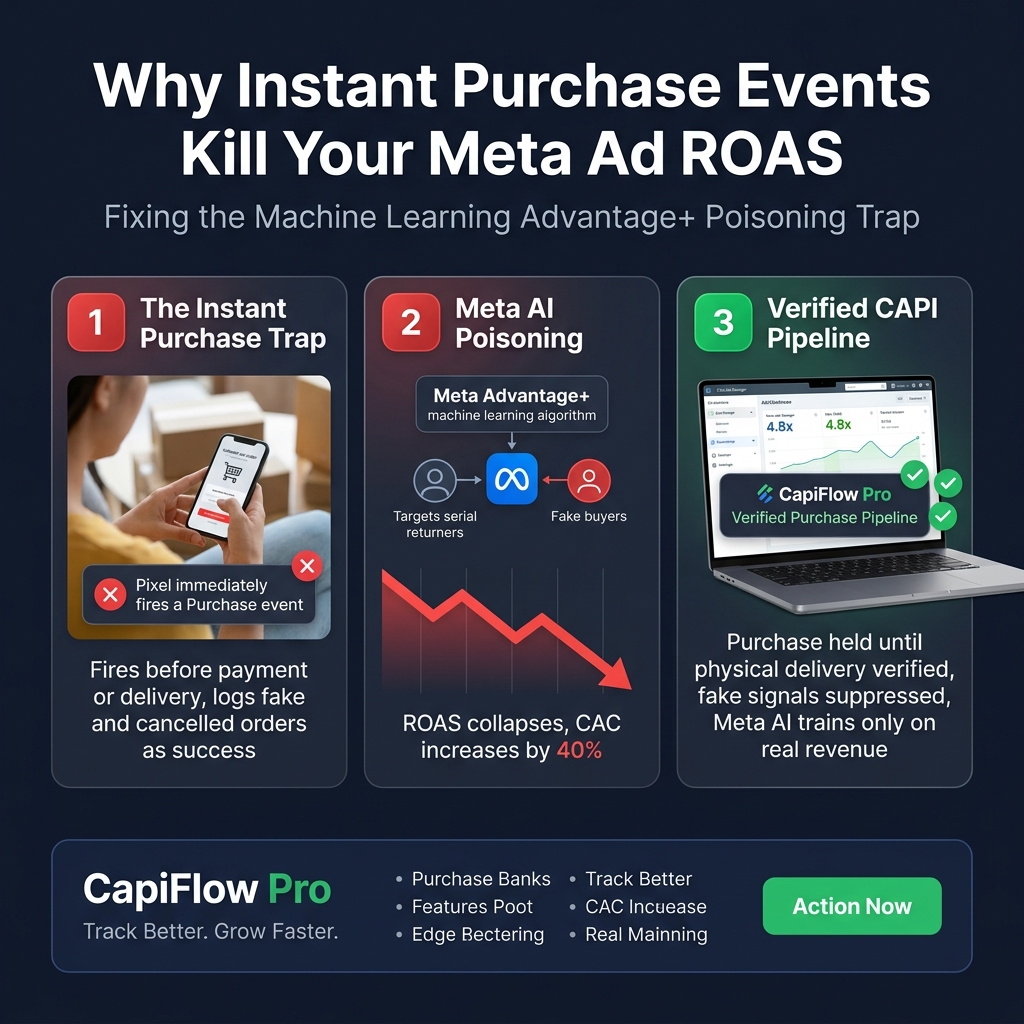
On the surface, this sounds logical. But under the hood of Meta’s machine learning engine, firing an instant Purchase event the second an order is placed is one of the most destructive mistakes you can make for your advertising profitability.
If your business experiences order cancellations, payment chargebacks, high return rates, or Cash on Delivery (COD) friction, this standard setup trains Meta’s algorithm to hunt for the wrong people.
Here is the exact data science behind how instant purchase signals poison your ad account—and the verified server-side architecture required to fix it.
1. The Machine Learning Feedback Loop: Garbage In, Garbage Out
Meta’s ad auction does not understand your bank account or your physical warehouse. It only understands conversion signals.
When you run an Advantage+ Shopping Campaign or a Sales Objective campaign:
1. Meta builds a 128-dimensional mathematical vector representing your “converting customer” based on the user profiles that fire your Purchase event.
2. The algorithm looks at demographic data, browsing affinities, time of engagement, past purchase frequency, and device characteristics.
3. It then bids aggressively in real-time auctions to display your ads to prospective users who mirror that profile.
Now, consider what happens when:
- A customer orders 3 sizes of the same jacket with the explicit intention of returning 2 of them.
- A user submits a test or fake order with a bogus phone number.
- An impulsive buyer cancels 30 minutes after checkout because of buyer’s remorse.
- A credit card transaction enters review or fails 3D-Secure authentication.
If your tracking tool (whether it’s native Pixel, standard GTM, or standard WooCommerce plugins) fires the Purchase event immediately upon page load:
Meta logs that user as your ideal paying customer.
Meta’s AI immediately expands lookalike clusters around that profile: serial returners, impulsive cancellers, and low-intent browsers. Within 30 days, your real-world blended ROAS collapses, customer acquisition costs (CAC) soar, and your fulfillment team is drowning in unpaid or returned inventory.
2. Browser Pixels Can’t Un-ring the Bell
Once a standard browser-based pixel fires a Purchase event into Meta’s dataset, it cannot be recalled or adjusted via JavaScript. The event is permanently committed to your 7-day click / 1-day view attribution window.
Even if you refund the order 2 hours later in WooCommerce:
- The browser pixel has already closed its connection.
- Meta’s Ads Manager continues reporting a profitable ROAS.
- Your media buyer increases ad spend on that specific ad set, unaware that the revenue never cleared your bank account.
This discrepancy between “Ads Manager ROAS” and “Bank Account Cash Flow” is why so many eCommerce brands scale into bankruptcy.
3. The Solution: The Verified Purchase Event Pipeline
To safeguard your advertising efficiency, your tracking architecture must decouple Order Placement from Revenue Confirmation.
This requires a two-stage server-side pipeline:
[Customer Checkout]
       │
       ▼
Order Created in WooCommerce (Status: 'Pending' or 'Processing')
       │
       ├─► [DO NOT FIRE Instant Purchase to Meta]
       │
       ▼
Fulfillment & Verification Check
       ├─► Fraud / Courier / Payment Verified?
       │        │
       │        ├─► NO (Cancelled / Fraud / Return):
       │        │     └─► Hold or Dispatch Negative Signal (Drop user from conversion model)
       │        │
       │        └─► YES (Status: 'Completed' / Delivered):
       │              └─► Dispatch Verified Server-Side Purchase via Meta Graph API v21
       │
       ▼
Meta Receives Clean, 100% Monetized Data
Stage 1: The Free Version Safety Valve (Manual Status Verification)
In the free version of CapiFlow, the Purchase event is detached from the frontend thank-you page. Instead:
- Browsers fire lightweight engagement events (
InitiateCheckout,AddPaymentInfo). - The high-value
Purchaseevent is held in reserve on your origin server. - Only when an administrator reviews the order and transitions the status to
Completeddoes the server make an authenticated cURL request directly to Meta’s Graph API. - Fake orders and customer cancellations are simply moved to
CancelledorTrash—never touching Meta’s AI dataset.
Stage 2: The Pro Enterprise Pipeline (Real-Time Logistics & Courier Sync)
In CapiFlow Pro, this verification is fully automated without manual human intervention:
1. Courier Webhook Sync: CapiFlow Pro listens to live logistics tracking status (Pathao, Steadfast, REDX, ShipStation, etc.).
2. Delivery-Triggered Dispatch: The server-side Purchase event is fired at the exact millisecond the physical parcel is marked as Delivered by the courier’s handheld terminal.
3. Session Enrichment: Even though the delivery happens 48 to 72 hours after checkout, CapiFlow Pro preserves the original _fbp, _fbc, IP, and event_id from the initial checkout session. Meta matches the conversion with 8.5+ Event Match Quality using Graph API v21’s 7-day server lookback window.
4. Negative Purchase / Cancellation Signals: If the order is marked Returned or Failed Delivery, CapiFlow Pro dispatches an event suppression signal, informing Meta’s bidding model to exclude similar audience segments from future ad distributions.
4. Real-World Case Study: 32% CAC Reduction in 45 Days
A mid-sized apparel retailer running WooCommerce switched from instant browser tracking (via PixelYourSite) to CapiFlow Pro’s Verified Purchase Pipeline.
Baseline Metrics (Instant Purchase Firing):
- Reported Ads Manager ROAS: 4.2x
- Real Blended ROAS (Net of Returns & Cancellations): 2.1x
- Return to Origin (RTO) / Cancellation Rate: 28%
- Average Cost Per Acquisition (CAC): $24.50
45 Days After Implementing Verified Server Purchase:
- Meta’s Advantage+ algorithm stopped targeting chronic cancellers and serial returners.
- Real Blended ROAS climbed from 2.1x to 3.8x.
- RTO / Cancellation Rate dropped from 28% down to 9%.
- Average CAC dropped from $24.50 down to $16.60 (a 32.2% reduction in acquisition cost).
The retailer did not change their ad creatives, copy, or landing page design. They simply stopped feeding garbage data to Meta’s machine learning model.
5. How to Implement Verified Tracking on Your Store
If you are ready to stop subsidizing low-quality traffic:
1. Audit Your Current Pixel: Check your WooCommerce thank-you page source code. If you see fbq('track', 'Purchase', ...) executing on page load before payment verification, your ad account is vulnerable.
2. Implement Server-Side CAPI: Deploy a self-hosted engine like CapiFlow that controls when server payloads are transmitted.
3. Align Order Status with Business Truth: Configure your server tracking so that only fulfilled, paid transactions transmit conversion values to Meta, Google Analytics 4, TikTok, and Pinterest.
Your ad performance is only as smart as the data you feed it. Feed it real revenue, and your ROAS will take care of itself.
Ready to protect your ad budget with verified server-side tracking?
Upgrade to CapiFlow Pro Today →